
Don't be afraid of challenges
바닐라 JS로 댓글 쓰기/수정/삭제 만들기 본문
팀 프로젝트로 나는 댓글 쓰기, 수정,삭제를 담당하였다
DBMS 없이 하는거라 임시 DB로 쓸만 한 localStorage를 사용하였다
와 이거 바닐라 JS로 하려니까 너무 미치겠다
맨날 React로 하다가 안쓸려니까 약간,,, 담배 끊으려고 노력하는 기분 lol
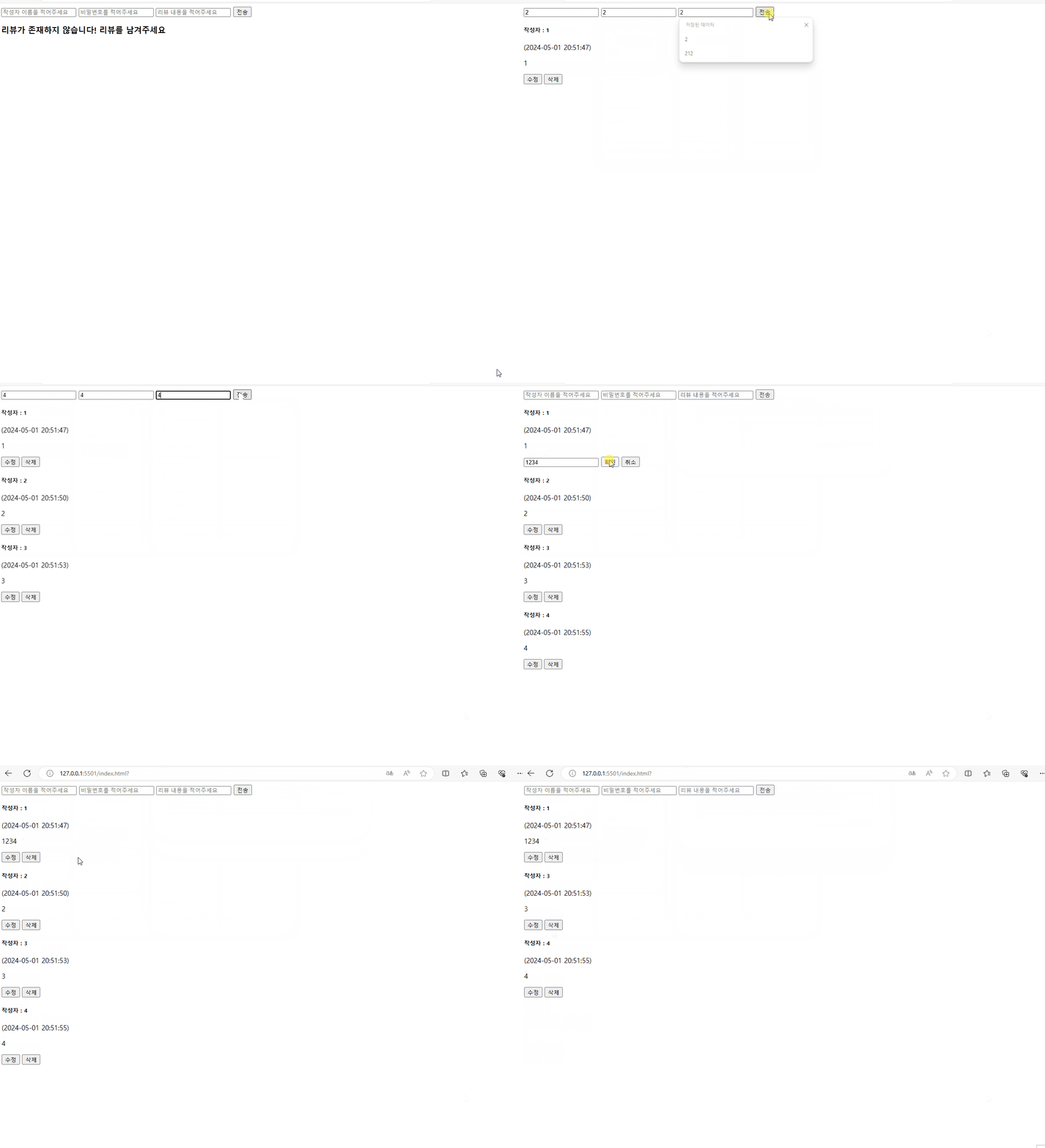
전체코드
const $input_user_name = document.getElementById("input-user-name"); // 사용자 이름
const $input_user_password = document.getElementById("input-user-password"); //사용자 비밀번호
const $input_comment = document.getElementById("input-comment"); //댓글 인풋
const $content_comment = document.getElementById("content-comment"); // 댓글 내용 담는 용
const $button_comment = document.getElementById("button-comment"); //댓글 버튼
let postId = 1; // 지금 보고 있는 포스트 id 이거 바꿔야함
let comments = JSON.parse(localStorage.getItem(`${postId}`)) || []; // 댓글 데이터

/**댓글 불러오기 및 사용자 확인*/
const callGetCommentData = () => {
  if (!comments.length) {
    $content_comment.innerHTML = `<h3>리뷰가 존재하지 않습니다! 리뷰를 남겨주세요</h3>`;
    return;
  }
  $content_comment.innerHTML = comments.reduce((prev, cur, index) => {
    return ($content_comment.innerHTML += `
  <div data-index="${index}">
    <h5>작성자 : ${cur.username}</h5> <span>(${cur.date})</span>
    <p>${cur.content}</p>
    <div id="confirmDiv">
    <button id="button-modify-${index}">수정</button>
    <button id="button-delete-${index}">삭제</button>
    </div>
  </div>
`);
  }, "");
};
window.onload = callGetCommentData();

/**댓글 달기 */
const handleSendComment = () => {
  let newComment = {
    username: $input_user_name.value,
    userpw: $input_user_password.value,
    content: $input_comment.value,
    date: handleDateFilter(),
  };
  comments.push(newComment);
  localStorage.setItem(`${postId}`, JSON.stringify(comments));
};
$button_comment.addEventListener("click", handleSendComment);

/** 날짜 데이터 필터링 함수 */
const handleDateFilter = () => {
  const today = new Date().toString().split(" ").slice(1, 5);
  let month = [
    "",
    "Jan",
    "Feb",
    "Mar",
    "Apr",
    "May",
    "Jun",
    "Jul",
    "Aug",
    "Sep",
    "Oct",
    "Nov",
    "Dec",
  ];
  return `${today[2]}-0${month.indexOf(today[0])}-${today[1]} ${today[3]}`;
};

/** 각 확인 버튼에 이벤트 리스너 등록 */
comments.forEach((_, index) => {
  /** 댓글 삭제 */
  const button_delete = document.getElementById(`button-delete-${index}`);
  button_delete.addEventListener("click", (e) => {
    const id = e.target.closest("div").parentElement.dataset.index;
    const input_confirm_password = window.prompt(
      "삭제를 위해 리뷰작성시 입력하였던 비밀번호를 입력하시오",
      ""
    );

    const userpw = JSON.parse(localStorage.getItem(`${postId}`))[id].userpw;
    if (input_confirm_password !== userpw) {
      alert("사용자 비밀번호와 맞지 않습니다!");
      return;
    }
    let delete_comment = JSON.parse(localStorage.getItem(`${postId}`));
    delete_comment.splice(id, 1);
    localStorage.setItem(`${postId}`, JSON.stringify(delete_comment));

    alert("삭제가 완료되었습니다!");
  });

  /** 댓글 수정 */
  const button_modify = document.getElementById(`button-modify-${index}`);
  button_modify.addEventListener("click", (e) => {
    const id = e.target.closest("div").parentElement.dataset.index;
    const input_confirm_password = window.prompt(
      "수정을 위해 리뷰작성시 입력하였던 비밀번호를 입력하시오",
      ""
    );

    const userpw = JSON.parse(localStorage.getItem(`${postId}`))[id].userpw;
    if (input_confirm_password !== userpw) {
      alert("사용자 비밀번호와 맞지 않습니다!");
      return;
    }

    const commentContent = JSON.parse(localStorage.getItem(`${postId}`))[id].content;
    const confirmDiv = e.target.closest("div");
    confirmDiv.innerHTML = `
              <input type="text" placeholder="수정하실 내용을 입력해주세요" id="input-modify-${index}" value="${commentContent}"/>
              <button id="button-confirm-${index}">확인</button>
              <button id="button-cancel-${index}">취소</button>
              `;
    const button_confirm =document.getElementById(`button-confirm-${index}`);
    button_confirm.addEventListener("click",()=>{
        let modify_comment = JSON.parse(localStorage.getItem(`${postId}`));
        modify_comment[id].content = document.getElementById(`input-modify-${index}`).value;
        localStorage.setItem(`${postId}`, JSON.stringify(modify_comment));

        alert("성공적으로 수정되었습니다!");
    });
    const button_cancel = document.getElementById(`button-cancel-${index}`);
    button_cancel.addEventListener("click",()=>{
       //취소
    })

  });
});
위에꺼는 수정/삭제 버튼을 누르고 검사한다음 수정/삭제 하는 건데
밑에꺼는 먼저 검사부터 하고 수정/삭제로 가는 루트다
const $input_user_name = document.getElementById("input-user-name"); // 사용자 이름
const $input_user_password = document.getElementById("input-user-password"); //사용자 비밀번호
const $input_comment = document.getElementById("input-comment"); //댓글 인풋
const $content_comment = document.getElementById("content-comment"); // 댓글 내용 담는 용
const $button_comment = document.getElementById("button-comment"); //댓글 버튼
let postId = 1; // 지금 보고 있는 포스트 id 이거 바꿔야함
let comments = JSON.parse(localStorage.getItem(`${postId}`)) || []; // 댓글 데이터

/**댓글 불러오기 및 사용자 확인*/
const callGetCommentData = () => {
  if (!comments.length) {
    $content_comment.innerHTML = `<h3>리뷰가 존재하지 않습니다! 리뷰를 남겨주세요</h3>`;
    return;
  }
  $content_comment.innerHTML = comments.reduce((prev, cur, index) => {
    return ($content_comment.innerHTML += `
  <div data-index="${index}">
    <h5>작성자 : ${cur.username}</h5> <span>(${cur.date})</span>
    <p>${cur.content}</p>
    <div id="confirmDiv">
    <input type="text" placeholder="사용자 확인을 위해 비밀번호를 입력해주세요" id="input-confirm-password-${index}"/>
    <button id="button-confirm-${index}">확인</button>
    </div>
  </div>
`);
  }, "");
};
window.onload = callGetCommentData();

/**댓글 달기 */
const handleSendComment = () => {
  let newComment = {
    username: $input_user_name.value,
    userpw: $input_user_password.value,
    content: $input_comment.value,
    date: handleDateFilter(),
  };
  comments.push(newComment);
  localStorage.setItem(`${postId}`, JSON.stringify(comments));
};
$button_comment.addEventListener("click", handleSendComment);

/** 날짜 데이터 필터링 함수 */
const handleDateFilter = () => {
  const today = new Date().toString().split(" ").slice(1, 5);
  let month = ["","Jan","Feb","Mar","Apr","May","Jun","Jul","Aug","Sep","Oct","Nov","Dec"];
  return `${today[2]}-0${month.indexOf(today[0])}-${today[1]} ${today[3]}`;
};

/** 각 확인 버튼에 이벤트 리스너 등록 */
comments.forEach((_, index) => {
  /** 사용자 확인 */
  const handleModify = (e) => {
    const id = e.target.closest("div").parentElement.dataset.index;
    const input_confirm_password = document.getElementById(
      `input-confirm-password-${id}`
    ).value;

    const userpw = JSON.parse(localStorage.getItem(`${postId}`))[id].userpw;
    if (input_confirm_password !== userpw) {
      alert("사용자 비밀번호와 맞지 않습니다!");
      return;
    }
    const commentContent = JSON.parse(localStorage.getItem(`${postId}`))[id]
      .content;
    const confirmDiv = e.target.closest("div");
    confirmDiv.innerHTML = `
            <input type="text" placeholder="수정하실 내용을 입력해주세요" id="input-modify-${index}" value="${commentContent}"/>
            <button id="button-modify-${index}">수정</button>
            <button id="button-delete-${index}">삭제</button>
            `;

    /** 댓글 삭제 */
    const button_delete = document.getElementById(`button-delete-${index}`);
    button_delete.addEventListener("click", () => {
      let delete_comment = JSON.parse(localStorage.getItem(`${postId}`));
      delete_comment.splice(id);
      localStorage.setItem(`${postId}`, JSON.stringify(delete_comment));

      alert("삭제가 완료되었습니다!");
    });

    /** 댓글 수정 */
    const button_modify = document.getElementById(`button-modify-${index}`);
    button_modify.addEventListener("click", () => {
      const input_modify = document.getElementById(
        `input-modify-${index}`
      ).value;
      let modify_comment = JSON.parse(localStorage.getItem(`${postId}`));
      modify_comment[id].content = input_modify;
      localStorage.setItem(`${postId}`, JSON.stringify(modify_comment));

      alert("성공적으로 수정되었습니다!");
    });
  };
  const button_confirm = document.getElementById(`button-confirm-${index}`);
  button_confirm.addEventListener("click", handleModify);
});
근데 수정/삭제 하고 난 뒤에 컴포넌트가 바로 업데이트 되지 않아서 고쳐야할 것 같다
'프로젝트' 카테고리의 다른 글
| git 명령어 (0) | 2024.12.27 |
|---|---|
| 깃허브 명령어 (1) | 2024.05.03 |
| 플랫폼비즈니스과정 첫번째 프로젝트 - 커뮤니티게시판 (0) | 2024.02.03 |
| [대외활동] 2023 인도네시아 창의충전소 (1) | 2023.10.16 |
| Whereparts - 관리자 페이지 (0) | 2023.06.19 |
'프로젝트' Related Articles
more

